


Following recent updates from Google, users are understandably concerned about the deep integration of AI features into Gmail. With the rollout of AI overviews, suggested replies, a Help Me Write feature, and AI inbox filters, Google’s Gemini AI now has broad access to your email contents by default.
While these tools are marketed as productivity boosters, many users are scrambling to disable Gemini in Gmail to reclaim their privacy. If you are among them, here is your complete guide to turning off Gemini, adjusting your Google Workspace settings, and understanding the implications of opting out.
Step-by-Step: How to Disable Gemini in Gmail
Turning off Gemini requires disabling the Smart Features that power it. These settings control how Google processes your data to provide AI-driven suggestions. Follow these steps carefully:
- Open the Gmail App on your mobile device or navigate to Gmail in your browser.
- Go to Settings (the gear icon).
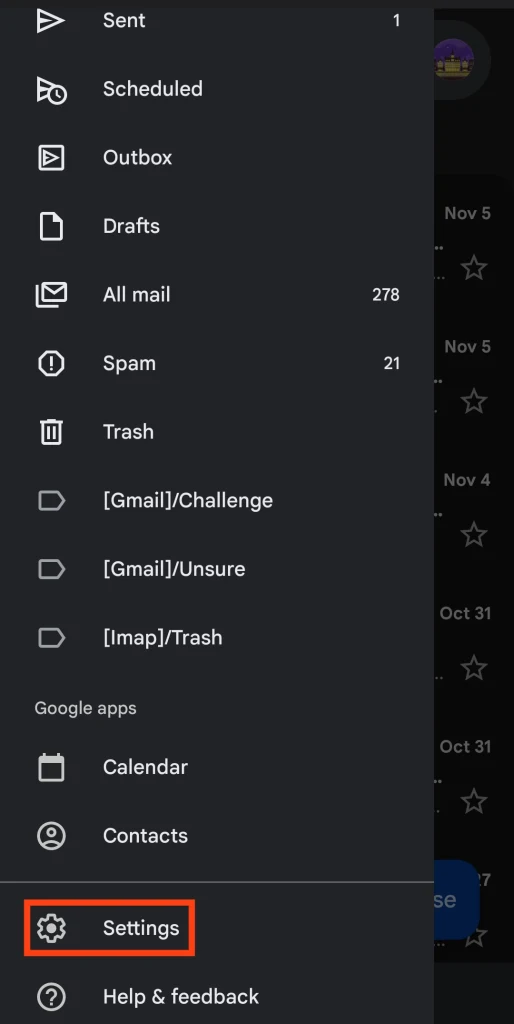
- Select your specific Gmail address from the list.
- Scroll down and uncheck the box for Smart features (this disables Gemini and its personalization functions).
- Navigate to Google Workspace smart features.
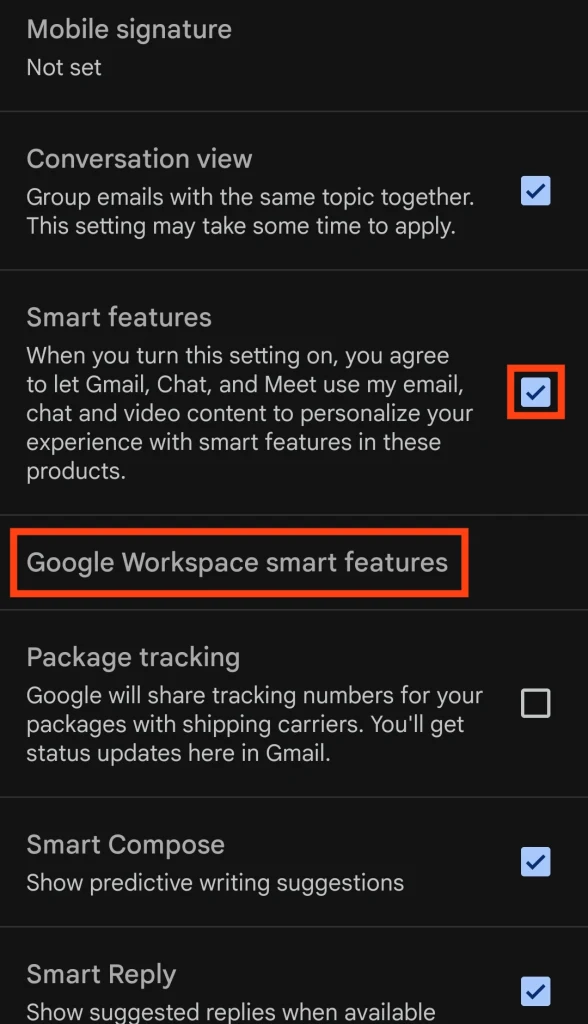
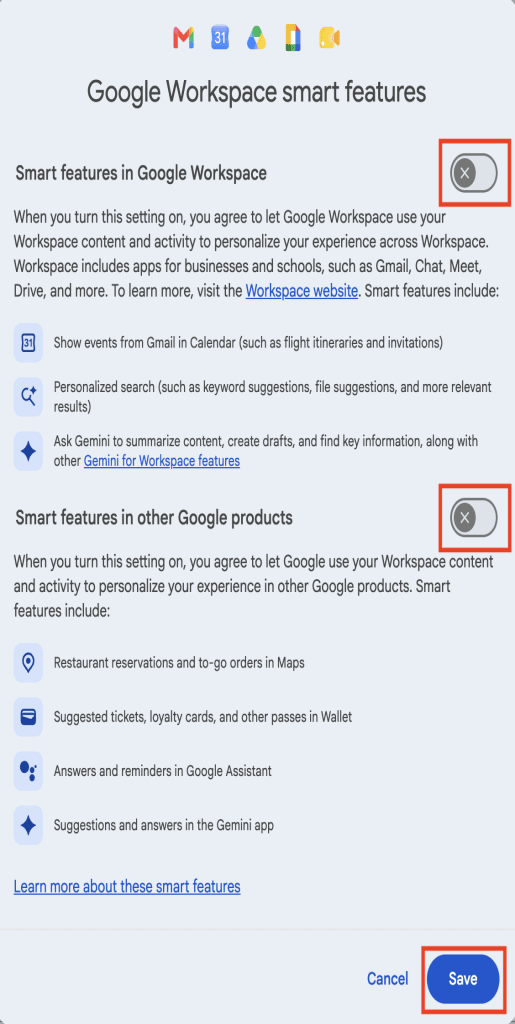
- Clear the checkboxes for:
- Smart features in Google Workspace
- Smart features in other Google products
Important Notes for Multiple Accounts
- If you have more than one Gmail account, you must repeat these steps for each account.
- However, the Google Workspace settings apply globally across your entire Workspace (including Google Drive). You only need to adjust those once.
The Catch: What Happens When You Turn Off Gemini?
Turning off these “Smart features” is a blunt instrument. Disabling Gemini also turns off basic, long-standing features such as spellchecking and standard email filtering. This is not a coincidence—it is a deliberate design choice by Google to discourage you from opting out of AI data processing. By disabling basic tools, Google makes your inbox feel less functional, pushing you to re-enable AI access.
Why Is Google Integrating Gemini into Gmail?
Google promises that Gmail’s 3 billion users will benefit from a “personal, proactive inbox assistant.” However, it’s crucial to ask: If the feature is free, what is the cost?
Make no mistake, Google is not acting out of generosity. The contents of your inbox are immensely valuable.
- The Privacy Shift: Email used to be a private space. Today, companies like Google are expanding AI access to private communications, framing it as “productivity.”
- Data Blurring: Gemini operates under its own terms of service, making it difficult to distinguish between data handled by Gmail itself and data processed by its AI systems.
- The Meta Precedent: Meta already uses chat data for targeted ads, showcasing how quickly AI features can reshape personal data usage. Google is following a similar path.
Why Should You Turn Off Gemini AI? (The Privacy Risks)
While you can switch off Gemini, Google makes it difficult on purpose. Here is why you should resist the convenience and prioritize your privacy:
1. You Can’t Guarantee What Google Will Do With Your Data
While Google asserts it won’t use your data to train its public models, the company has a track record of changing privacy policies. In 2024, Alphabet was fined nearly $2.9 billion dollars for monopolistic practices and failing to comply with regulators. Trusting Google to handle your inbox data is a significant risk.
2. Your Data Fuels Targeted Advertising
The more data Google collects, the more targeted ads it can show you. This profile includes your location, search history, and potentially your emails. While you can switch off personalized ads, you cannot stop Google from scanning your inbox to build your profile.
3. Your Data May Be Shared Beyond Google
If you use Gemini or Gmail add-ons, your data may be shared with third-party services. Connecting Gemini to apps like WhatsApp or Spotify allows those companies to process your data under their own privacy policies. Once your data leaves Google’s ecosystem, you lose control over how it is used.
The Best Alternative: Use AI That Respects Your Privacy
AI assistants can be incredibly helpful, but Big Tech (Google, Microsoft, OpenAI) treats your data as a business asset. If you want the benefits of AI without the privacy risks, consider a specialized solution.
How Oi Mail Protects Your Inbox
- End-to-End Encryption: When messaging other Oi users, your emails are fully encrypted. Oi cannot access your message contents.
- Password-Protected Emails: Send secure emails to users outside Oi (like Gmail users) with password protection.
- Total Data Control: Oi never exploits your data for advertising or training.
AI That Doesn’t Spy on You: Oi Scribe
If you need AI writing assistance, Oi Scribe is an opt-in add-on that offers AI-powered rewriting and fine-tuning. Unlike Google, Oi Scribe never trains on your data.
Your Private AI Assistant: Sore
For broader tasks, Sore provides a private AI assistant designed to help you without keeping logs of your conversations or turning your personal information into training material.
Ready to DeGoogle? Make the Switch Today
As Big Tech attempts to hijack your privacy in the name of convenience, you have a choice. You can reject systems that exploit your data and embrace solutions designed to protect you.
- Create a free Oi Mail account today.
- Use Easy Switch to seamlessly move your emails, calendars, and contacts.
Stop gambling with your inbox privacy. Turn off Gemini in Gmail and switch to a secure email provider that puts your data control first.
Click here to create your free Oi Mail account now.