

If you rely on Gmail to send emails from your Microsoft Outlook, Yahoo, or custom business domain address, pay close attention. A major feature is being sunset.
Google has officially announced the end of the road for the Gmail “Send as” feature. This setting currently allows users to send messages through Gmail’s interface while using a third-party email address as the sender.
Here is everything you need to know about the timeline, why Google is making this change, and how you can continue to manage multiple email addresses seamlessly.
Why Is Google Removing the “Send as” Feature?
Google confirmed it is ending support for the “Send as” functionality due to what it describes as “disproportionate maintenance resources.” Maintaining the technical infrastructure that allows users to send mail via external SMTP servers through the Gmail interface has become increasingly complex relative to its usage.
This is not a sudden change. The feature will be removed in stages, giving users time to adapt.
Key Dates & Timeline for Gmail “Send as” Retirement
Understanding the rollout timeline is crucial to avoid interruptions in your email workflow:
- Immediate (Now): Google has begun restricting new configurations for third-party “Send as” addresses on the web. If you haven’t set it up yet, you likely cannot do so now.
- Until January 2027: Existing “Send as” configurations will continue to work as normal during this transition period.
- January 2027 (Final Cutoff): The feature will be fully removed. At this point, you will no longer be able to send mail from third-party email accounts via Gmail on the web or mobile apps.
Note: While the ability to send is ending, you will still be able to read and check third-party emails (via POP3/IMAP) inside the Gmail app.
Gmailify Is Also Ending
In conjunction with “Send as,” Google is also pulling the plug on Gmailify in January 2027. Gmailify is a feature that extends Gmail’s advanced spam protection and inbox organization (like tabs) to third-party accounts. Once removed, third-party accounts managed within Gmail will lose these enhanced filtering capabilities.
How to Check if You Are Affected
If you already use the “Send as” feature, you are safe for now. Here is how to verify your current setup:
- Open Gmail and click Compose to start a new message.
- Look at the From field.
- If you see a drop-down arrow with an alternative email address listed (e.g., your Yahoo or Outlook address), your configuration is active.
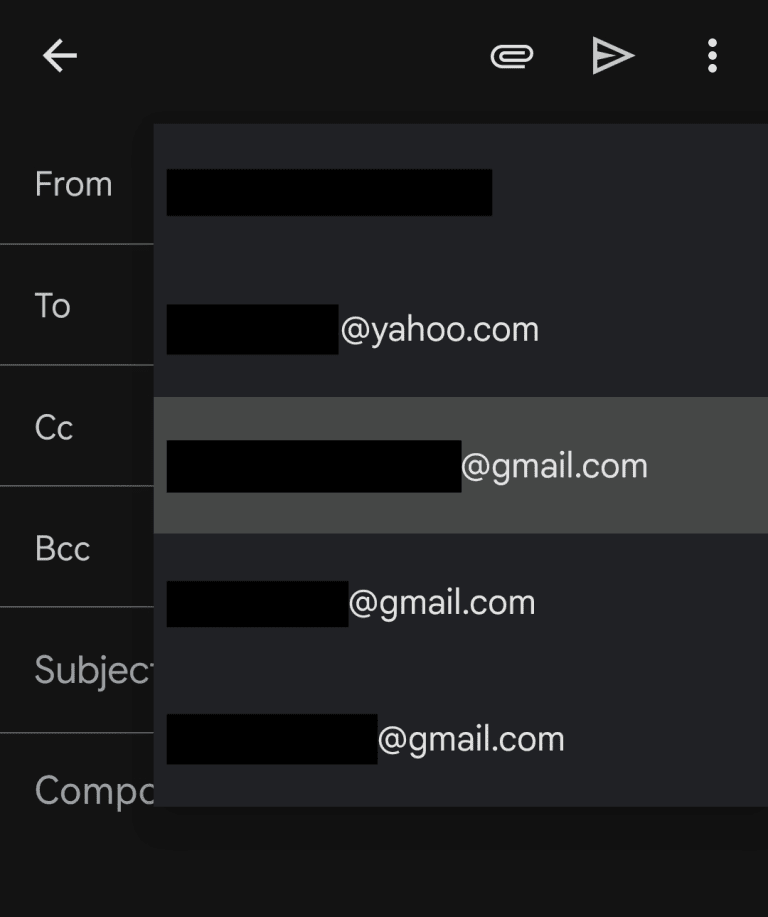
Should you set it up now? No. Since Google is no longer allowing new configurations, and the feature will vanish in 2027 anyway, there is no benefit to attempting to set this up now.
A History of Google Ending Features
This retirement is part of a broader trend at Google. In recent years, the company has frequently chosen to “sunset” features to focus resources on core AI and advertising products.
- Dark Web Report (Ended Early 2026): This tool scanned for your personal data in data breaches. Google shut it down, stating it “failed to provide useful follow-up steps,” and has yet to introduce a direct replacement.
- Privacy Sandbox (Scaled Back 2025): Google’s ambitious plan to replace third-party cookies with a privacy-friendly advertising alternative was significantly scaled back due to “low levels of adoption” from the industry.
These examples highlight the importance of not relying solely on Google for niche email management features.
Best Alternatives to Gmail “Send as” in 2026
If you manage multiple email accounts, you have options. While Google is removing this feature, other secure email providers are embracing it.
1. The Oi Mail Solution (Easy Switch)
If you are looking for a direct replacement with even better security, Oi Mail offers a robust alternative.
Through its Easy Switch feature, you can connect your Gmail account to Oi Mail. This allows you to:
- Send and receive messages from your Gmail address without leaving the Oi Mail interface.
- Import your existing Gmail message history.
- Forward new incoming Gmail messages directly to your Oi Mail inbox.
The Security Advantage: Messages forwarded through Oi Mail benefit from advanced privacy protections you don’t get with standard Gmail, including:
- Removal of known email trackers and spy pixels.
- Cleaning of malicious tracking links.
- Advanced spam filtering.
- Zero-access encryption for stored messages.
2. Native Email Clients (Outlook, Apple Mail, Thunderbird)
For a software-based approach, you can always set up your Gmail, Outlook, and Yahoo accounts natively in a desktop client. This allows you to send from any address without relying on Google’s web interface.
Frequently Asked Questions (FAQ)
Q: What happens to emails I’ve already sent via “Send as”?
A: Nothing. Your sent emails will remain in your Gmail Sent folder and the respective third-party account’s Sent folder. This change only affects your ability to send new emails.
Q: Is it safe to use a third-party tool to manage my Gmail?
A: It depends on the provider. Tools like Oi Mail offer strong privacy protections, including encryption. However, as long as you are sending from a Gmail address, Google remains part of the email delivery process.
Q: Will my Gmail account be deleted?
A: No. Your @gmail.com address remains active. This change only impacts the ability to alias external addresses (like @yahoo.com) to the Gmail interface.
Conclusion: Time to Plan Your Exit
The Gmail “Send as” feature allowed for convenient multi-account management, but its days are numbered. With the cutoff date set for January 2027, now is the time to evaluate your workflow.
If you want a seamless, privacy-focused alternative that allows you to manage your Gmail (and other accounts) without losing functionality, exploring platforms like Oi Mail is a smart move. However, remember: as long as you are sending from your Gmail address, Google still handles the delivery. If you are looking for a complete break from Google, consider moving to a dedicated secure email provider entirely.
Ready for a more private email experience? Learn more about Oi Mail’s Easy Switch feature here.